
Table of Contents
- What Are Drive-Up Storage Units?
- What Are the Benefits of Drive-Up Storage?
- Who Can Benefit From Drive-Up Storage Units?
- What Can You Store in a Drive-Up Unit?
- Are Drive-Up Storage Units the Same as Outdoor Storage?
- Are Drive-Up Units Climate Controlled?
- Drive-Up Storage vs. Indoor Storage
- What Should You Consider Before Renting a Drive-Up Unit?
- How to Load a Drive-Up Storage Unit
- Questions to Ask About Drive-Up Storage
- When Might Another Storage Type Be Better?
- Frequently Asked Questions About Drive-Up Storage Units
- FAQs
- Is a Drive-Up Storage Unit Right for You?
When you are storing furniture, business inventory, tools, moving boxes, or other bulky belongings, getting everything from your vehicle into the storage unit can make a big difference in the rental experience. Drive-up storage units are designed to make loading and unloading more convenient by allowing you to pull a vehicle close to the unit entrance.
For many renters, that accessibility is one of the biggest advantages of this type of storage. Instead of carrying heavy items through hallways or elevators, you may be able to move belongings directly between your vehicle and the storage unit.
However, drive-up storage is not the best fit for every situation. Availability, unit sizes, access, building design, and other features vary by property, so it is helpful to understand how these units work before choosing one.
What Are Drive-Up Storage Units?
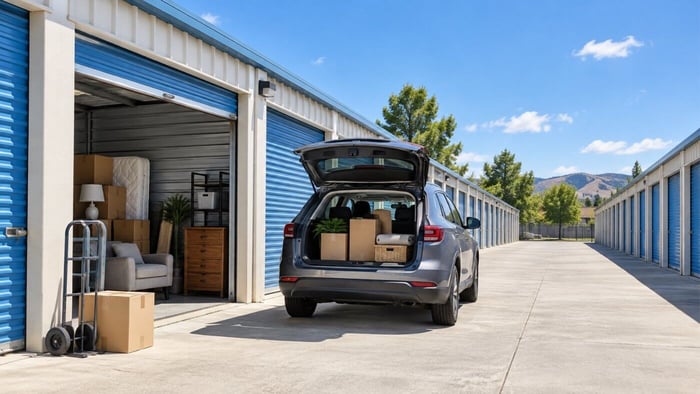
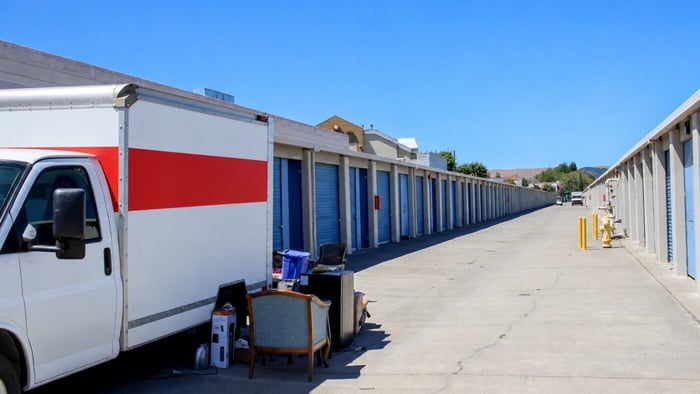
Drive-up storage units are typically located on the ground level with an exterior-facing door that can be accessed from a driveway or loading area.
At many facilities, renters can pull a car, pickup truck, moving van, or other vehicle near the entrance of the unit. This can shorten the distance belongings need to be carried during move-in, move-out, or regular visits.
The concept is similar to accessing a private garage, although the exact design varies by facility.
Some drive-up units may have roll-up doors, while others may use different entry systems. Unit dimensions, driveway widths, access hours, security features, and vehicle clearance also differ from one property to another.
Because of these variations, it is important to review the specific features available at the facility you are considering.
What Are the Benefits of Drive-Up Storage?
The main benefit of drive-up storage is straightforward: easier access to your belongings.
This can be especially valuable when you are moving large quantities of items or visiting your storage unit regularly.
Shorter Carrying Distance
Being able to park close to the unit can reduce the amount of time and effort required to move belongings.
Instead of carrying a dresser, tool chest, or stack of boxes through a building, you may be able to move it directly from the vehicle into the unit.
That can make a significant difference when you have:
Heavy furniture
Large boxes
Business inventory
Tools or equipment
Moving supplies
Appliances
Bulky household belongings
A shorter carrying distance can also make repeated trips to the unit easier to manage.
Easier Loading and Unloading
Drive-up access can simplify the logistics of moving day.
You can often position your vehicle near the unit, open the storage door, and begin unloading without navigating multiple interior doors, hallways, or elevators.
This may be particularly useful if you are renting a moving truck or trailer and have several large items to unload.
Convenient Access for Frequently Used Items
Not everyone rents storage simply to pack belongings away for months at a time.
Some renters need regular access to inventory, equipment, seasonal supplies, or household items.
Drive-up storage can make these visits quicker because you may be able to load or unload directly from your vehicle.
For example, a small business owner who visits a storage unit several times each week may value easy vehicle access differently than someone storing household furniture during a six-month relocation.
Who Can Benefit From Drive-Up Storage Units?
Drive-up units can work for many different storage situations.
People Moving or Renovating
Moving often involves furniture, boxes, appliances, and other bulky belongings.
A drive-up unit can simplify the process by reducing the distance these items need to be carried.
The same applies during renovations. If you are temporarily moving furniture, décor, or household items out of a room while work is completed, easy vehicle access can make multiple trips more manageable.
Small Business Owners
Businesses may use storage for:
Inventory
Tools
Equipment
Shipping supplies
Displays
Marketing materials
Seasonal merchandise
When employees or business owners regularly need to pick up or drop off items, drive-up access may make the storage unit easier to incorporate into everyday operations.
However, facility rules and permitted uses vary, so businesses should confirm access policies and storage restrictions before renting.
Contractors and Tradespeople
Contractors, technicians, landscapers, and other mobile professionals may need additional space for tools, supplies, or equipment between jobs.
A ground-level unit with vehicle access may make loading items into a work truck or van more convenient.
Households With Heavy or Bulky Items
Even if you do not plan to access the unit frequently, drive-up storage can make the initial move easier when you have large furniture, heavy boxes, sporting equipment, or other cumbersome belongings.
What Can You Store in a Drive-Up Unit?
The types of belongings you can store depend on the individual facility's rental agreement and policies.
In general, renters often use drive-up units for household belongings such as furniture, moving boxes, tools, sporting equipment, durable household goods, and business supplies.
Some facilities may also allow certain vehicles or equipment to be stored inside eligible units, but this should never be assumed.
Vehicle storage requirements can involve additional rules related to registration, insurance, fuel, size, or unit dimensions.
Always confirm the property's policies before attempting to store a car, motorcycle, ATV, or other vehicle.
Similarly, hazardous materials, flammable substances, perishable food, illegal items, and other prohibited belongings should not be stored unless specifically permitted by the rental agreement.
Are Drive-Up Storage Units the Same as Outdoor Storage?
Not exactly.
A drive-up unit is generally an enclosed storage space with an exterior entrance that you can approach by vehicle.
Outdoor storage or parking, on the other hand, usually refers to a designated space for a vehicle, RV, boat, trailer, or other large item.
These are different storage types and may not be offered at the same facility.
A property may offer drive-up storage units without offering RV or boat parking. Likewise, another facility may offer vehicle parking but have no drive-up enclosed units.
Check the individual location's available storage options rather than assuming one feature means another is available.
Are Drive-Up Units Climate Controlled?
Drive-up access and climate control are two separate storage features. Most drive-up units are standard storage units, designed primarily to provide convenient ground-level access for loading and unloading.
Climate-controlled options are available at some storage facilities, but availability is much more limited and varies by location.
If you are storing belongings that may be sensitive to temperature changes or other environmental conditions, review the storage options offered at your local facility before choosing a unit.
An enclosed unit should not automatically be assumed to be climate-controlled. When climate control is important to your storage needs, confirm the specific features of the unit before renting.
Drive-Up Storage vs. Indoor Storage
The right choice often depends on what you prioritize.
Drive-Up Storage May Be a Good Fit If:
You are storing large or heavy items, expect to visit the unit frequently, want to minimize carrying distance, or plan to load and unload directly from a vehicle.
Indoor Storage May Be a Better Fit If:
You prefer an interior building environment, are storing items that may benefit from climate-controlled options available at the facility, or do not need vehicle access directly beside your unit.
Neither option is automatically better. For some renters, convenient loading is the top priority. For others, an interior location or a specific storage environment may matter more.
What Should You Consider Before Renting a Drive-Up Unit?
A little planning can help you avoid surprises on move-in day.
Unit Size
Choose a unit based on both the quantity and dimensions of what you plan to store.
Measure large furniture, equipment, appliances, or other bulky belongings before renting.
It is also helpful to consider how much open space you want inside the unit. Packing a unit completely full may maximize space, but it can make it harder to reach belongings later.
Door Dimensions
A unit may have enough square footage for an item while still having an entry door that is too narrow or too short.
If you are storing particularly large furniture or equipment, ask about the unit's door dimensions.
Vehicle Clearance
If you plan to use a moving truck, trailer, or larger work vehicle, ask whether the facility's driveways and loading areas can accommodate it.
Do not assume every vehicle can navigate every part of the property.
Access Hours
Drive-up storage does not automatically mean 24-hour access.
Access schedules vary by facility and may differ from office hours.
If you expect to visit early in the morning, late in the evening, or frequently for business purposes, confirm the access hours before renting.
Frequency of Visits
Think about how often you will need the belongings.
If you expect regular access, organize the unit accordingly. Leave a walkway and place frequently used items near the front.
If you are storing items long-term and rarely expect to visit, your priorities may be different.
How to Load a Drive-Up Storage Unit
Easy exterior access does not mean everything should simply be stacked inside.
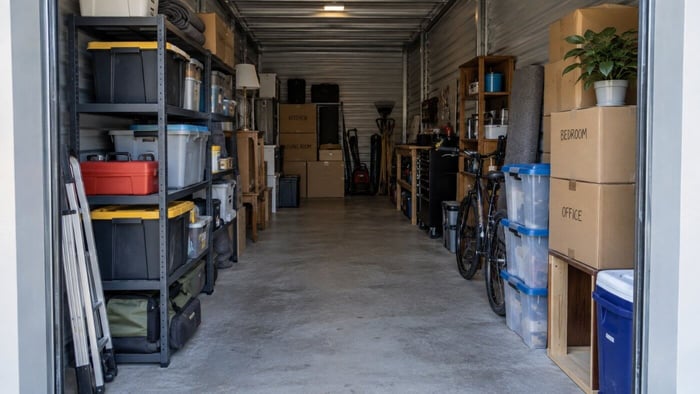
A little organization can make the unit much more useful.
Place heavy and sturdy belongings near the bottom, and avoid stacking heavy boxes on fragile furniture or delicate items.
Create clear categories for your belongings, such as:
Furniture
Household boxes
Tools
Seasonal belongings
Business supplies
Frequently accessed items
Label boxes on more than one side so you can identify them even when they are stacked.
If you expect to retrieve items regularly, leave a walkway from the entrance toward the back of the unit.
You may also want to create a simple inventory of what you stored and where it is located.
Questions to Ask About Drive-Up Storage
Before renting, ask the facility:
Are drive-up storage units available at this location?
What sizes are offered?
What are the door dimensions?
Can my vehicle pull directly up to the unit?
What are the property access hours?
Can moving trucks or trailers navigate the driveways?
Are the units climate controlled?
Are there restrictions on business inventory or equipment?
Are vehicles allowed inside eligible units?
What items are prohibited?
Are there any special loading or parking rules?
These questions can help you compare storage options based on your actual needs rather than simply choosing by unit size.
When Might Another Storage Type Be Better?
Drive-up access is convenient, but there are situations where another option may make more sense.
You may prefer an indoor unit if you do not need frequent access, if your belongings are easy to carry, or if the indoor options at the facility offer features that better fit what you are storing.
Someone storing a few boxes of documents, photographs, or sensitive electronics may have very different priorities than someone storing landscaping tools or a dining room set.
The best choice depends on the belongings, local conditions, access needs, and available options at the specific property.
Frequently Asked Questions About Drive-Up Storage Units
FAQs
What does drive-up storage mean?
Drive-up storage generally refers to a ground-level storage unit with an exterior-facing entrance that allows a vehicle to pull near the unit for loading and unloading.
Are drive-up storage units easier to move into?
They can be. Being able to park near the unit may reduce carrying distance, particularly when moving furniture, equipment, appliances, or large quantities of boxes.
Can I park my car inside a drive-up storage unit?
Some facilities may allow eligible vehicles in certain units, while others may not. Vehicle-storage policies vary, so confirm requirements with the individual facility before renting.
Do drive-up units have electricity?
Do not assume that they do. Electrical access varies by property and unit. Ask the facility if electricity is important for your storage needs.
Are drive-up storage units climate controlled?
Not necessarily. Drive-up access and climate control are separate features. Ask whether the specific unit you are considering includes climate control.
Can I access a drive-up unit 24 hours a day?
Not necessarily. Facility access hours vary by location. Confirm the access schedule before renting.
Are drive-up units good for business storage?
They can be useful for businesses that frequently load inventory, tools, supplies, or equipment. Businesses should confirm permitted uses, access hours, and facility rules before choosing a unit.
Is a Drive-Up Storage Unit Right for You?
Drive-up storage can be a practical choice when convenience, frequent access, or easy loading is a priority.
If you are storing furniture, business supplies, tools, equipment, or other bulky belongings, being able to bring a vehicle close to the unit may simplify both move-in and future visits.
Before renting, compare the unit's size, door dimensions, location, access hours, environmental features, and facility policies.
Most importantly, confirm what is actually available at your local storage property. Drive-up storage units, access features, permitted uses, and available sizes vary by facility.
Content & Image Disclosure: This article was developed with AI assistance and reviewed and edited by our team for accuracy and relevance. Some images may be AI-generated or digitally enhanced for illustrative purposes and may not depict an actual facility, unit, or available feature. Facility features, availability, policies, and storage options vary by location.